Picture This:
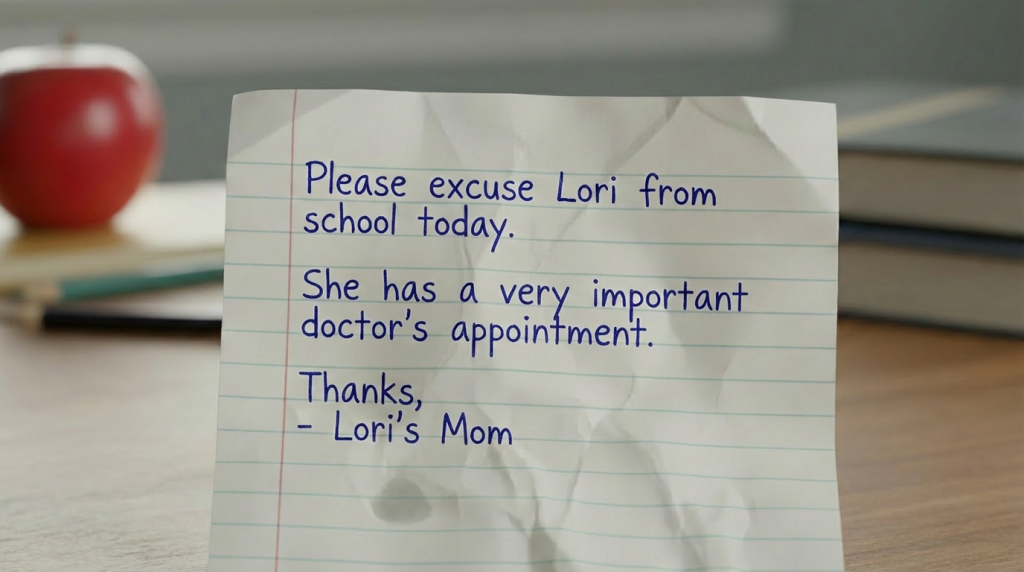
Imagine you're a teacher, and a student walks up to your desk with a note that says:
"Please excuse Lori from gym class today. She has a doctor's appointment. - Lori's Mom"
Here's the problem: Did Lori's mom really write this note? Or did Lori write it herself so she could skip gym?
Without a way to check, you have to guess. And if you guess wrong:
- Maybe Lori skips class when she shouldn't (security problem)
- Maybe you send Lori back to class when her mom really DID write the note (deliverability problem)
Your email has the exact same problem.
When an email shows up in someone's inbox claiming to be "from yourcompany.com," how does Gmail or Outlook know it's really from you—and not a scammer pretending to be you?
That's what SPF, DKIM, and DMARC solve. And the best way to explain it is with a story about notes from home.
So what does this have to do with forged notes?
The Problem: Fake Notes
Kids figured out they could write their own "notes from parents" to get out of class, leave school early, or avoid homework.
Some kids got really good at copying their parents' handwriting. Some printed notes on the computer so they looked official.
Teachers were getting tricked.
In email terms: This is called spoofing—when a criminal sends an email that looks like it came from your company, but didn't.
The Solution: How Parents Fight Back
Parents got together and said: "We need a system so teachers know when a note is really from us."
Here's what they came up with:
Step 1: The "Approved Paper" List (SPF)
Each parent tells the school: "I only write notes on paper from these specific places."
For example:
- Mom writes notes on yellow sticky notes
- Dad writes notes on the notepad from his office
- Grandma writes notes on floral stationery
The school keeps a list. If a note shows up on notebook paper ripped out of a binder, the teacher knows: "That's not on the approved list. This might be fake."
In email terms, this is SPF (Sender Policy Framework): You publish a list of mail servers that are allowed to send email for your domain. If a message comes from somewhere else, it's suspicious.
Step 2: The Parent's Signature Stamp (DKIM)
Some parents get a special stamp (like a notary seal) that's really hard to fake. Every real note gets stamped.
The school knows: "If the stamp is there and it's legit, this note is real. If the stamp is missing or wrong, something's fishy."
In email terms, this is DKIM (DomainKeys Identified Mail): It's a digital signature added to your emails that proves they came from you and weren't changed along the way.
Step 3: The Parent's Instructions to the School (DMARC)
Now here's the really important part.
Even with the "approved paper list" and the "signature stamp," the school still needs to know: "What should we DO if a note fails the checks?"
So each parent gives the school a rulebook that says:
Option 1: "Monitor Mode" (p=none)
"If a note claiming to be from me doesn't pass your checks, go ahead and accept it anyway—but write it down and send me a report at the end of the week so I know someone might be faking my notes."
This is the safest way to start. You're just collecting information, not blocking anything yet.
In email terms: Messages get delivered normally, but you get reports showing what passed and what failed.
Option 2: "Hold for Verification" (p=quarantine)
"If a note claiming to be from me doesn't pass your checks, don't automatically believe it. Send the kid to the office and call me to double-check before you let them leave class."
In email terms: The message goes to the spam/junk folder instead of the inbox. It's still delivered, but flagged as suspicious. The recipient can find it if they go looking.
Option 3: "Reject Fake Notes" (p=reject)
"If a note claiming to be from me doesn't pass your checks, don't accept it at all. Send the kid back to class. Don't even call me—just assume it's fake."
This is the strongest protection.
In email terms: The receiving mail server refuses the message entirely. It never reaches the inbox, spam folder, or anywhere else. It's stopped at the door.
Why This Matters for Your Business
1. Someone Might Be Writing "Fake Notes" Using Your Name
Just like kids faking notes to skip class, criminals send fake emails pretending to be your company to:
- Trick people into clicking malicious links
- Steal login credentials
- Convince someone to pay a fake invoice
If your domain doesn't have DMARC, email providers have to guess whether a message is really from you—and sometimes they guess wrong.
2. Email Providers Are Checking Notes More Carefully Now
Google, Yahoo, and other email providers have gotten stricter about authentication (especially since 2024). They want to see:
- Your "approved paper list" (SPF)
- Your "signature stamp" (DKIM)
- Your "rulebook" (DMARC)
Without them, your legitimate emails are more likely to end up in spam—or get rejected entirely.
3. DMARC Gives You Control
Without DMARC, each email provider decides on their own what to do with suspicious messages claiming to be from you.
With DMARC, YOU tell them: "Here's my policy. Here's what I want you to do."
It's like giving every teacher in every school your rulebook, so they all handle fake notes the same way.
4. You Get Actionable Reports (Though You May Want Help Interpreting Them)
DMARC reporting tells you things like:
- How many messages are being sent claiming to be from your domain
- Which ones are passing or failing authentication
- Patterns that might indicate problems
What the reports won't tell you: The exact content of fake messages or a perfect list of "here's every spoof attempt." The reports are more like summary data than a detailed investigation.
How to Set It Up (The Safe Way)
Most businesses roll out DMARC in stages:
- Set up your "approved paper list" (configure SPF correctly)
- Get your signature stamp ready (enable DKIM on your mail systems)
- Start in monitor mode (publish DMARC with p=none)
- Read the reports and fix issues (make sure your legitimate mail is passing)
- Turn on enforcement (move to p=quarantine, then p=reject when ready)
This way, you don't accidentally block your own legitimate emails while you're learning how everything works.
The Bottom Line
DMARC is like giving every email provider your rulebook for handling notes that claim to be from you.
Quick Summary:
- SPF is your approved paper list
- DKIM is your signature stamp
- DMARC is your policy: monitor / hold for verification / reject fakes
Without it, scammers can write "fake notes" using your name—and teachers (email providers) have to guess whether they're real.
With it, you're in control.
DMARC is one of those things that prevents a whole lot of problems before they start—which is exactly what good IT security is all about.
Run our free DMARC analyzer to see where you stand. If you're getting an F (and most businesses are), we'll help you fix it.